


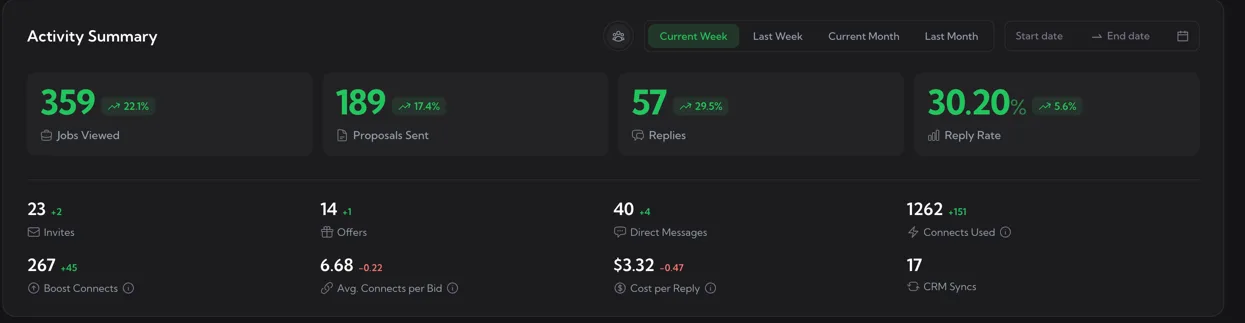
Activity Summary is the top panel of the Dashboard. It collapses your team’s bidding into ten or so KPIs and shows how each one moved compared to the previous period of the same length.
The four hero metrics
The first row has four large green numbers, each with a coloured delta vs the previous period.
- Jobs Viewed – how many job-detail pages your team opened. A useful proxy for “how much pipeline are we even looking at?”
- Proposals Sent – total proposals submitted on Upwork (manual + Auto Bid combined).
- Replies – replies received from clients. A reply means the client responded to your proposal in any form, including invites and direct messages.
- Reply Rate – Replies ÷ Proposals Sent, expressed as a percentage. The number is colour-coded:
- Green when reply rate ≥ 10% – healthy
- Yellow when ≥ 5% but < 10% – acceptable
- Red when < 5% – work on relevance, prompts or matching
The secondary metrics row
Below the hero block sits a denser row of supporting metrics. They’re driven by the same date range and member filter.
- Invites – invitations from clients to apply. Independent of your own bidding effort and a strong signal that your profile is being discovered.
- Offers – offers received (the formal Upwork “Send Offer” step). A subset of Replies, but more meaningful because the client is ready to hire.
- Direct Messages – DMs initiated by clients on Upwork without a proposal you sent. Same idea as Invites but in a freer form.
- Connects Used – total Upwork connects burned (base bid cost + boost). The hover tooltip spells out the formula.
- Boost Connects – connects spent specifically on Boosted Proposals. Equals Connects Used minus the base bid cost.
- Avg. Connects per Bid – Connects Used ÷ Proposals Sent. A rising number usually means your team is boosting more aggressively.
- Cost per Reply – converts connects spend into a USD figure per reply received. Formula:
Connects used × Upwork's per-connect price ÷ Replies. The lower the better. - CRM Syncs – only shown when Pipedrive is connected. Counts how many Upwork chats were pushed to Pipedrive in the selected period.
For Connects Used, Boost Connects, Avg. Connects per Bid, and Cost per Reply, a decrease is the good outcome – so the delta colouring is inverted: a green ↘ means you spent less, a red ↗ means you spent more.
Filters
Two filter rows sit in the panel header.
- Period chips – Current Week, Last Week, Current Month, Last Month. The selected chip is green; the others are grey. Default is Current Week.
- Date range picker – Start date → End date. Picking a custom range overrides the period chip and turns it grey.
- Member picker – the small avatar in the panel header. Choose a single team member to filter the metrics to their activity, or All Members for team-wide totals.
How the comparison works
The delta badge next to each metric (e.g. +22.1%) compares the selected period to the equivalent previous period of the same length:
- Current Week compares against Last Week
- Current Month compares against Last Month
- Custom date ranges compare against the same number of days immediately before
If a metric had no value in the previous period (e.g. you just signed up), the delta badge is hidden so you don’t see a confusing “+∞%”.
Reading these numbers in practice
- Low Reply Rate, high Proposals – too much spray, not enough relevance. Tighten your Auto Bid match score and review your cover-letter templates.
- Low Reply Rate, low Proposals – your team isn’t bidding enough. Loosen Auto Bid filters or set up daily caps.
- Cost per Reply trending up – usually means more Boost Connects burned without proportionally more replies. Decide whether the boost is worth it.
- Invites + Direct Messages climbing – your profile content is doing the work; clients are finding you. Treat these as warm leads in the CRM.