


A Cover Letter in Upwex is a template you write once and reuse for every Upwork job. When AI generates a proposal, it takes your template, fills in the variables, blends in the job description, and produces a personalized cover letter.
Why use templates instead of AI “from scratch”?
- Consistency – your cover letters have a recognizable voice and structure
- Control – you decide what to emphasize (years of experience, niche expertise, CTA)
- Speed – generating from a template is faster than AI inventing structure every time
- Measurability – each template tracks its own reply rate, so you know which templates produce winning proposals
Templates are stored in your account
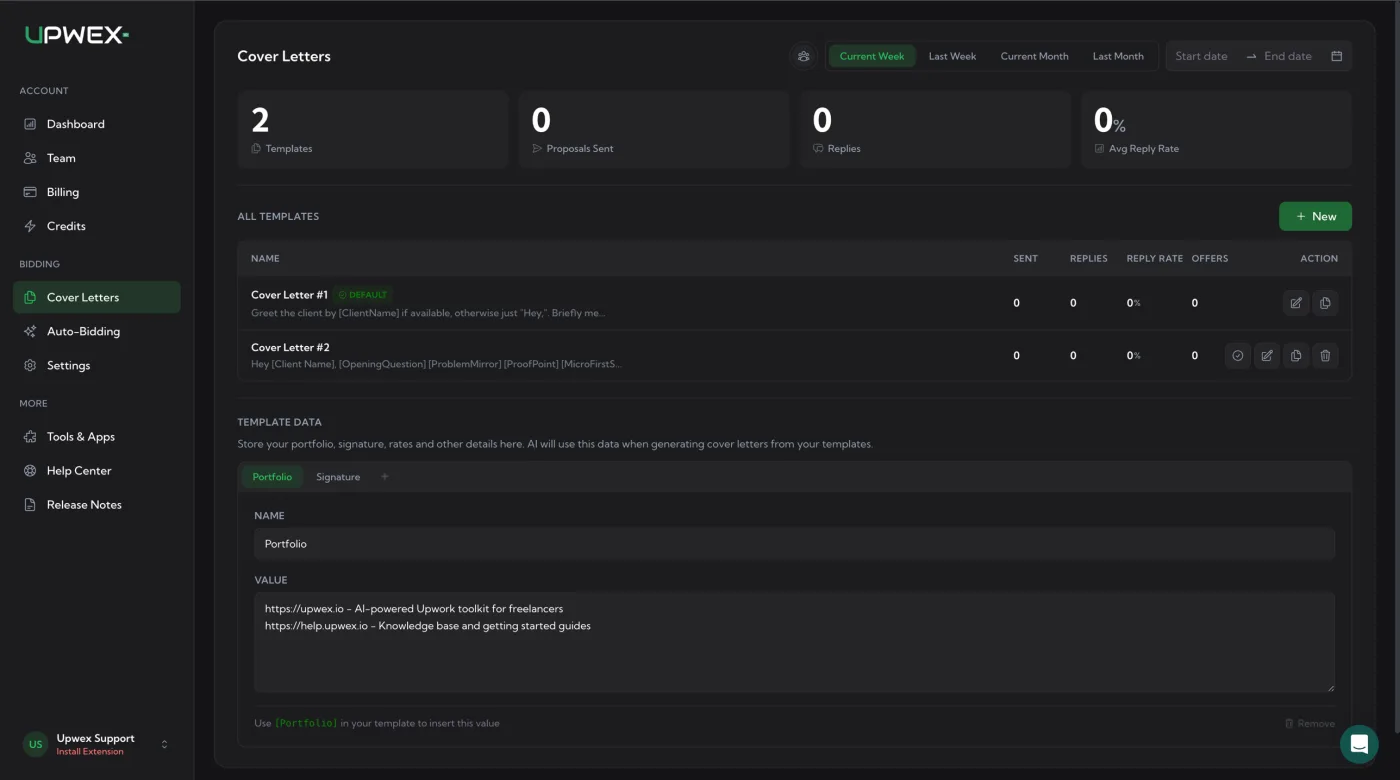
Find all your cover letter templates on the Cover Letters page. Use the + New button to create a new template. One template is always marked as DEFAULT – that’s the one the widget pre-selects when you open a job. The header strip displays usage stats for the selected period – total templates, proposals sent, replies, and average reply rate.
Template Data – your reusable values
Below the templates list there’s a TEMPLATE DATA section. Here you store portfolio links, your signature, rates and any other repeatable details once – and then reuse them across every template instead of pasting them in by hand.
Each entry has two fields:
- NAME – the label, e.g.
PortfolioorSignature. - VALUE – the actual content (links, your full signature block, rate, etc.).
To use a value in a template, insert its name in brackets: e.g. [Portfolio] in the cover letter body will be replaced with the value of the Portfolio entry at generation time. Switch tabs at the top of the section (Portfolio, Signature, …) to manage each entry, or add your own with the + tab.
You can have many templates
Most users create 3–5 templates for different scenarios:
- One short, punchy template for quick jobs
- One detailed template for enterprise clients
- One niche template for a specific skill (e.g. “React only”)
- One creative template to stand out on saturated job categories
When you submit a proposal, you pick which template to use in the widget dropdown.