


If your AI Credits balance is dropping faster than expected, the first thing to know is that every AI action costs exactly one credit in Upwex – there are no 2- or 3-credit actions. So a high spend means many actions, not expensive ones.
What costs a credit
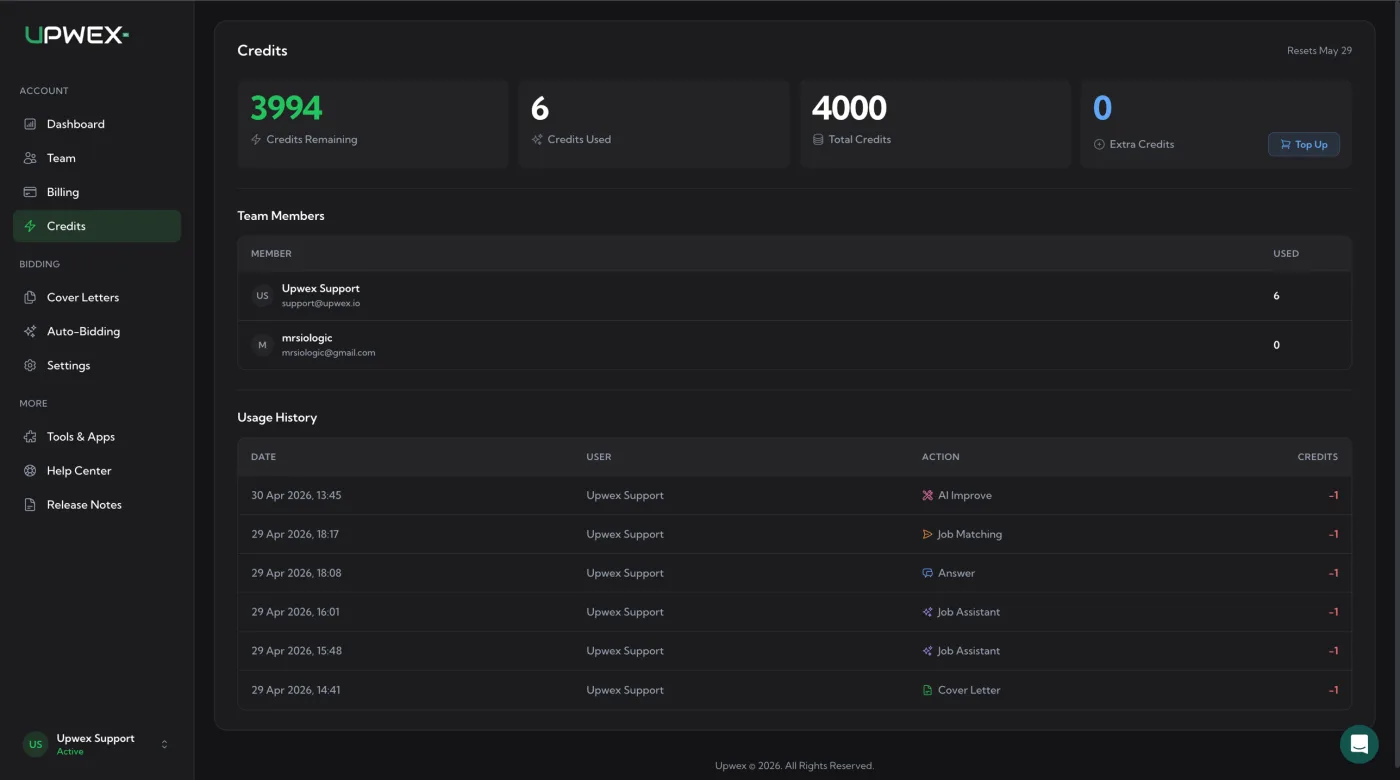
The Usage History table on the AI Credits page lists every action that has consumed credits. Each row is −1 credit; there are no multi-credit deductions. The action labels you’ll see:
- Cover Letter – generating a cover letter for a job (the Cover Letter widget on the proposal page).
- Job Assistant – running the Job Assistant on a job-detail page (job summary, fit check, recommended approach).
- Job Matching – Auto Bid evaluating a single job against your profile to decide whether it’s a match.
- Auto Bid – Auto Bid actually submitting a proposal for a matched job.
- Answer – generating answers to client screening questions on the proposal page.
- AI Improve / AI Generate – improving an existing cover-letter template or generating a new one in the Prompts editor.
- Test Template – testing a saved prompt against a sample job inside the Prompts editor.
Regenerating any of these results – clicking Regenerate on a cover letter, re-running Job Assistant – counts as a separate action and consumes one more credit each time.
Where to see your usage
Open account.upwex.io/credits. Four stat cards at the top summarise the team:
- Credits Remaining (green) – what’s left in this cycle.
- Credits Used – total spend in this cycle.
- Total Credits – the cycle’s allowance from your plan.
- Extra Credits (blue) – top-up reserve. Has a Top Up button for buying more.
In the corner you’ll see Resets <date> – that’s when your monthly allowance of 50 credits per seat refills (your billing cycle, not the calendar month). The 7-day free trial is different: it comes with 20 credits in total for the whole trial, and they do not reset.
Why credits empty fast
Auto Bid is doing both halves of the loop
Auto Bid spends two credits per processed job in practice – one Job Matching credit when it evaluates the job, and one Auto Bid credit when it submits a proposal. So a daily cap of 50 submissions can quietly cost ~100 credits/day if the matcher is also running on lots of skipped jobs.
Tighten it: raise the Match score threshold in Auto Bid settings, narrow your search query, or lower the daily cap. The fewer jobs the matcher sees, the fewer Job Matching credits you spend.
Job Assistant on every job you open
Job Assistant runs once per job-detail page. If you open lots of jobs out of curiosity, that’s one credit each – even if you never submit a proposal.
Tighten it: filter on Upwork before opening jobs (budget, posted date, client info), so you only invoke Job Assistant on jobs you might actually bid on.
Regenerating proposals more than once
Each regeneration is another full credit. Three rerolls of a cover letter = 4 credits for one job (1 original + 3 regens).
Tighten it: accept the first generation and edit by hand for small tweaks – only regenerate when the result is genuinely off.
One team member running ahead of the rest
The credit pool is shared across the whole team – all members consume from the same Total Credits. The Team Members table on the AI Credits page shows credits used per member, so you can see who’s burning the bulk.
Coordinate: agree on a per-person budget; if one person is running heavy Auto Bid, others may want to scale back manual use, or the Owner can buy a Top Up.
Top-Up reserve (Extra Credits)
The Top Up button on the AI Credits page buys a one-time credit pack (from 100 credits for $5.99 up to 5000 credits for $264.99) that goes into the Extra Credits bucket. Extra Credits don’t reset at renewal – they sit there until consumed, so a Top Up is a safe way to bridge to the next cycle. Top Up requires an active subscription. Step-by-step instructions are in Top up AI Credits.
When optimization isn’t enough – use your own AI key
On Flex every seat adds 50 credits per month to the shared team pool. Flex is the only plan, so there is no larger allowance to upgrade to. If you’re consistently hitting the wall even after raising thresholds and limiting Auto Bid, you have two options:
- Top up extra credits when you need them. They never expire.
- Connect your own OpenRouter key in Tools & Apps (available on a paid Flex subscription, not during the free trial). AI then runs on your OpenRouter balance and does not use Upwex credits; these actions show in Usage History with an Own AI key badge. If the key fails or runs out of OpenRouter balance, AI falls back to your plan credits and a red banner with an Update button appears. See What are AI Credits for the setup steps.