


Upwex has three team roles – Owner, Admin, and Member. Permissions are hierarchical: anything a Member can do, an Admin can also do; anything an Admin can do, the Owner can also do.
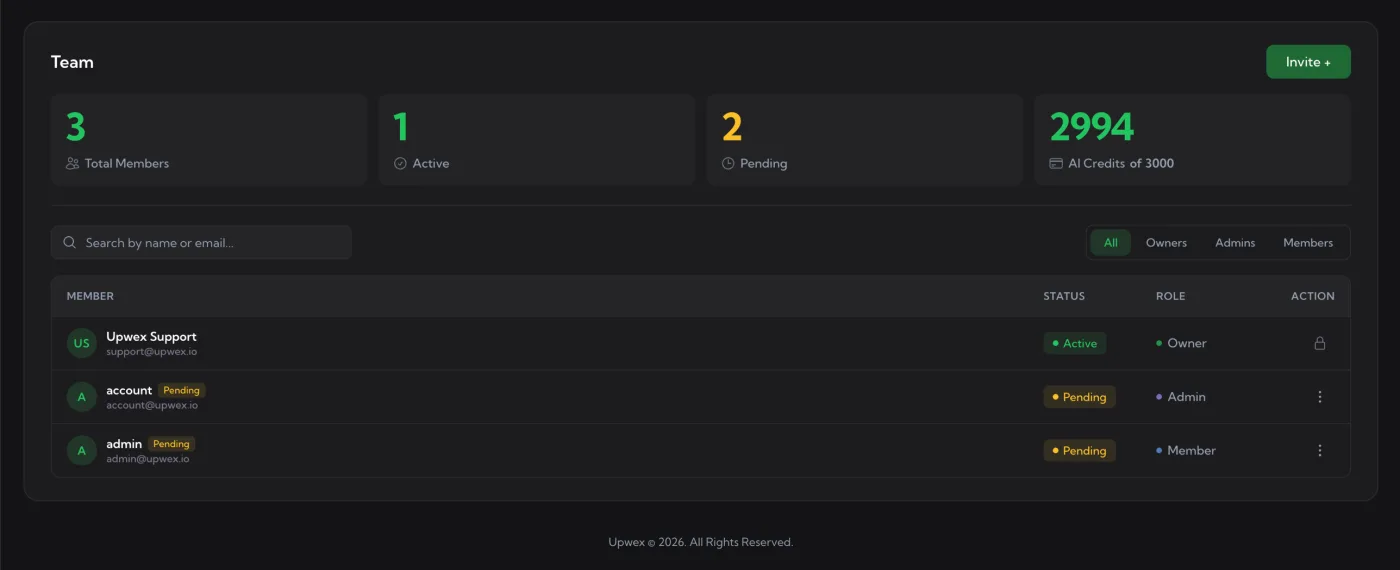
On the Team page each role is shown as a coloured dot next to the role name in the ROLE column:
- ● Owner – green
- ● Admin – purple
- ● Member – blue
Owner
The top role. Every team has exactly one Owner – the person who created the Upwex account. The Owner cannot be demoted, removed, or changed via the UI; the Action column shows a lock icon instead of the kebab menu. To transfer ownership, contact support.
- ✅ All billing actions (switch between monthly and yearly, cancel)
- ✅ Invite / remove members
- ✅ Change any other member’s role (Admin ↔ Member)
- ✅ Buy and assign seats / AI credits
- ✅ Configure settings, prompts, Auto Bid rules, CRM
- ✅ See all analytics across all profiles
- ✅ Use AI features
Admin
Admins have almost all Owner permissions except for account ownership itself.
- ✅ Invite new members and resend invites
- ✅ Remove Admins or Members (cannot remove the Owner)
- ✅ Toggle other people between Admin and Member via the ⋮ menu
- ✅ Top up AI credits and manage seats
- ✅ Configure prompts, Auto Bid rules, CRM
- ✅ See all analytics
- ✅ Use AI features
- ❌ Cannot change their own role
- ❌ Cannot transfer ownership or delete the team
Member
Members are regular users who use Upwex on their own Upwork profile but don’t manage the team.
- ❌ Cannot invite or remove team members
- ❌ Cannot change roles
- ❌ Cannot manage seats or buy credits
- ✅ Use AI features (drawing from the team’s shared AI credits)
- ✅ Edit team-shared cover letter prompts
- ✅ See analytics for their own profile
Changing a role
On the Team page, click the ⋮ menu in the Action column on the right side of the row. The menu offers Make Admin or Make Member – a single toggle between the two. The Owner row does not have this menu (lock icon instead), and you cannot change your own role from the table.
Best practice
For most agencies, a good setup is:
- Owner – the agency principal (billing contact)
- Admin – project managers / ops who run the team day-to-day
- Member – freelancers doing the bidding