


If your team burns through its monthly plan credits before the next billing renewal – for example during a launch week, an agency volume spike, or a heavy Auto Bid run – you don’t have to wait. Buy a one-time top-up pack on the AI Credits page: extra credits are added to your balance the moment payment clears, never expire, and stay there until used.
Where the Top Up button lives
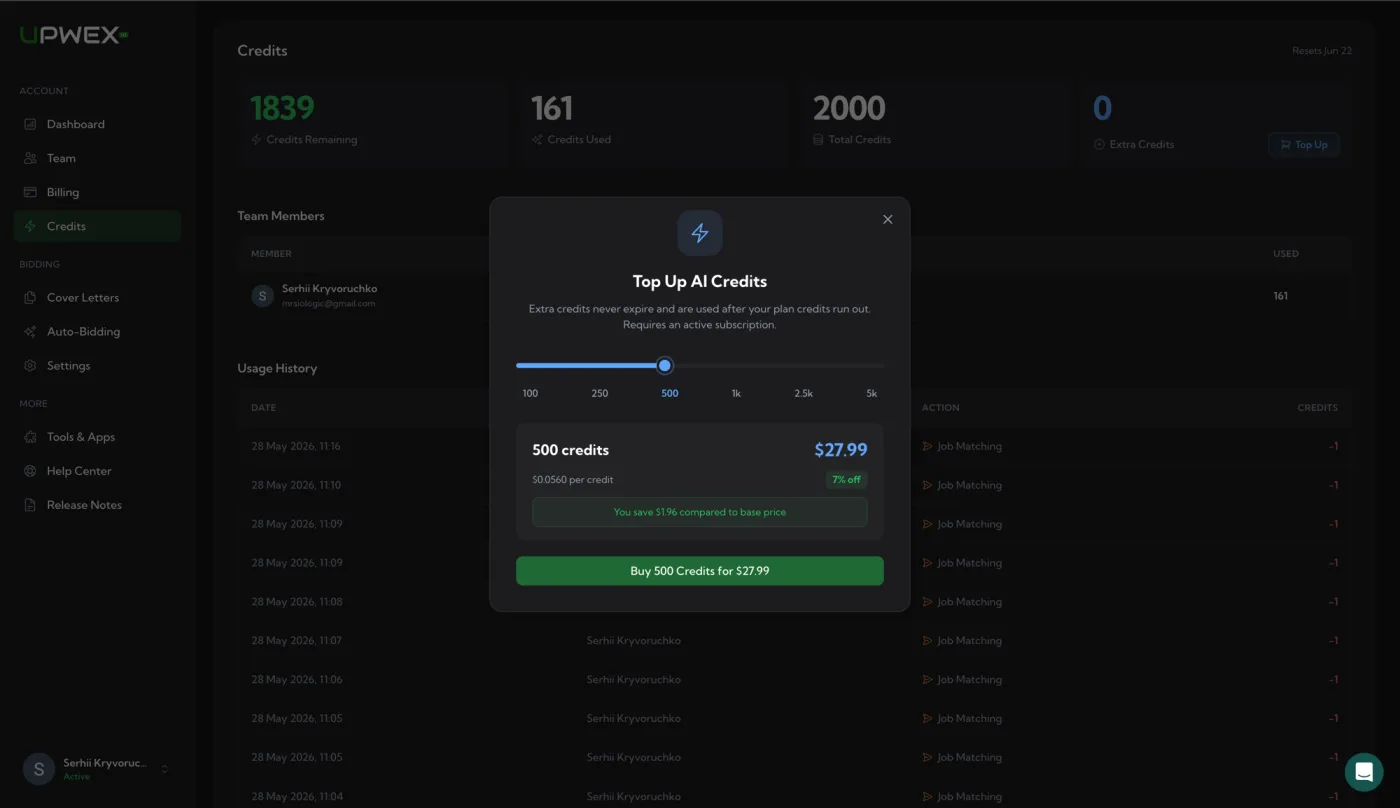
Open account.upwex.io/credits from the left sidebar (Account → Credits). The page header shows four hero cards:
- Credits Remaining – green; the balance available right now (plan pool + extra)
- Credits Used – how many credits the team has spent in the current billing cycle
- Total Credits – your plan’s monthly allowance
- Extra Credits – purchased top-ups that never expire, with a blue Top Up button next to the number
Click Top Up. A modal opens with the credit-pack picker.
Pick a pack with the slider
The Top Up modal uses a single slider with six stops – 100, 250, 500, 1k, 2.5k, 5k. Drag the handle (or click any tick label) to switch packs. The price card below updates instantly:
- Pack size in big type – e.g. 1 000 credits
- Total price in big type – the current price for the selected pack
- Per-credit rate – small grey text showing the price per credit for that pack
- Discount badge – green pill showing the volume discount (only on packs above 100; the 100-credit pack is the base rate)
- Savings banner – shows how much you save compared with buying the same number of credits at the base per-credit rate
- Confirm button – full-width green, labelled with the selected pack and its price
The six packs
Top-ups come in six fixed sizes. Pricing is fixed, and the bigger the pack, the lower the price per credit. The 100-credit pack is the base rate.
- 100 credits – $5.99
- 250 credits – $14.49
- 500 credits – $27.99
- 1000 credits – $54.99
- 2500 credits – $134.99
- 5000 credits – $264.99
The exact price, per-credit rate, discount and savings for each pack are always shown live in the Top Up modal – drag the slider to any pack to see its current numbers.
What happens when you click Buy
Upwex doesn’t redirect you to Stripe Checkout. Instead, it creates a one-off Stripe invoice, charges the same payment method that pays for your subscription (off-session, no card form to fill in), and finalises the purchase in the background. Specifically:
- You click Buy N Credits for the selected pack.
- Upwex sends a request to the billing API; Stripe creates and finalises an invoice using your saved card.
- On success – the modal closes, a toast confirmation appears, the Extra Credits hero card updates immediately (no page reload needed), and the new transaction is added to Usage History with a +N credits green badge.
- If the card declines or anything else fails – the modal stays open with an inline error and your balance is unchanged. No partial state.
Because the charge runs on your subscription’s saved card, top-ups inherit your subscription’s invoicing settings – receipt email, VAT, and tax-ID rules all apply.
You need an active subscription
Top-ups are an add-on to a paid plan, not a replacement for one. If your subscription has been cancelled or has lapsed, the Top Up modal shows the hint “Subscribe to purchase” instead of the Buy button. Re-activate your plan from the Billing page first, then come back to top up.
Who on the team can top up
Only Owner and Admin roles see the Top Up button on the Credits page. Members see the same balance, the same Usage History, and the same plan info, but the Top Up button isn’t rendered for their role – keeping spend control in the hands of whoever manages billing.
Pack credits never expire
Unlike your monthly pool, which resets on every billing renewal, Extra Credits never reset. Buy 5000 in March, use 1200, and you keep the remaining 3800 indefinitely, even if you sit idle for months. Unused credits carried over from an old Lite, Pro or Max plan land in the same Extra Credits balance and never expire either.
This means a top-up is a long-term reserve, not a use-it-or-lose-it buy. You can stockpile during a sale and burn it across many months.
Pack vs your own AI key
Flex is the only plan, and it already includes every feature, so there is no higher plan to upgrade to. If you need more AI capacity, you have two options:
- Occasional spike (product launch, agency burst, single big bidding day) – buy a pack. You only pay for what you need, and leftover credits stay for later.
- Consistent overrun (you’re hitting zero every month) – connect your own OpenRouter key in Tools & Apps (available on a paid Flex subscription). AI then runs on your OpenRouter balance and does not use Upwex credits. If the key fails or runs out of balance, AI falls back to your credits. Details are in Understanding AI Credits.
Receipts and invoices
Every top-up generates a Stripe invoice. Find it on the Billing page → Payment History, alongside your subscription invoices. Click any row to download the PDF for accounting.
Related articles
- Understanding AI Credits – what credits are and how they’re spent
- Edit billing information (including VAT) – make sure your invoices have the right tax data before you top up
- Switch to Flex or change your billing period – moving from an old plan to Flex and what happens to unused credits