


AI Credits are the metering currency for everything AI-powered in Upwex. Every cover letter, screening-question answer, job analysis, Quick Apply, and Auto Bid submission spends credits from your team’s monthly pool. Credits replenish automatically with each billing cycle, and you can buy non-expiring top-ups any time you need a boost.
The two kinds of credits
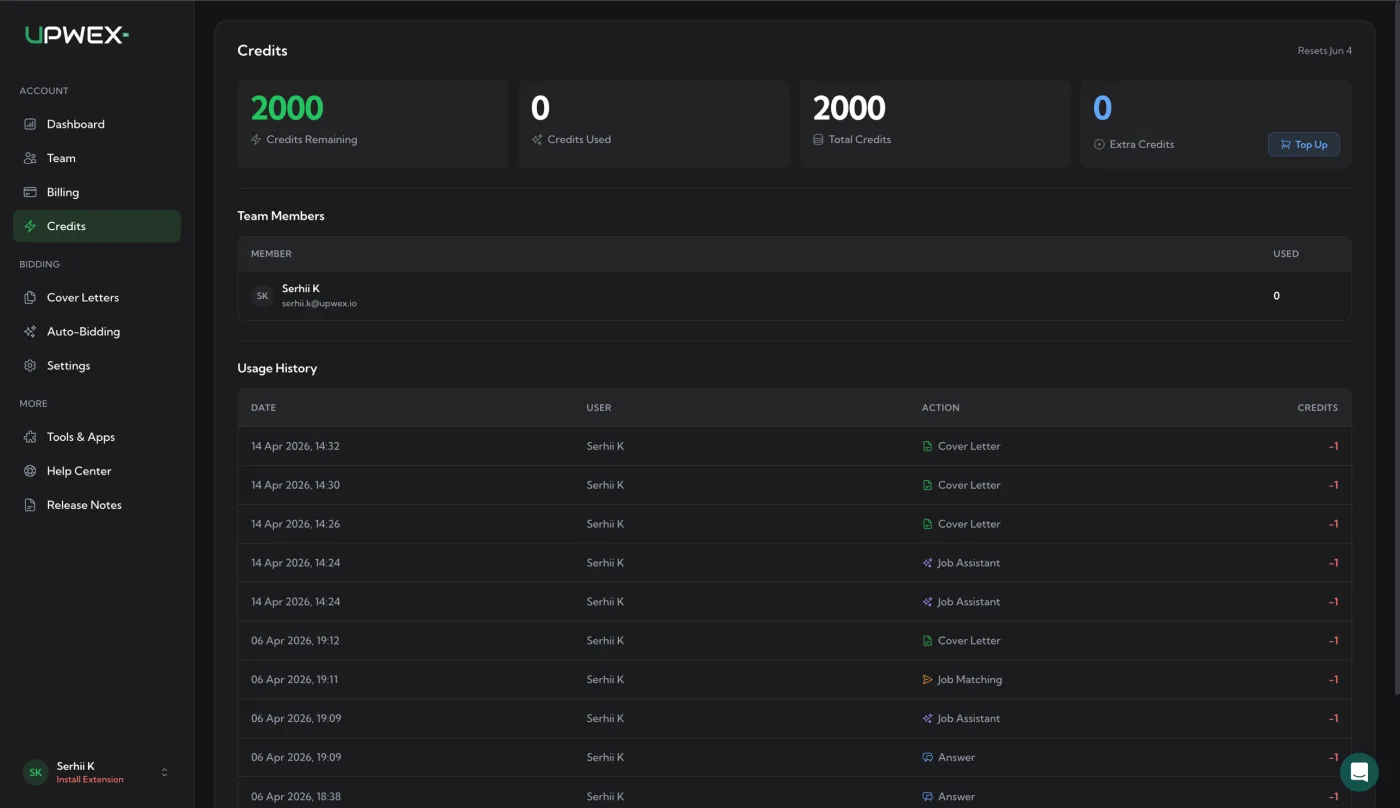
Your team has two separate buckets, both visible on the AI Credits page:
- Plan credits (the pool) – included with your subscription. Refilled fresh on every billing renewal; the pool resets to your plan’s allowance and any unused credits do not carry over.
- Extra credits (top-ups) – one-time packs you purchase separately. They never expire, never reset, and stack on top of your plan pool. Used after plan credits run out (or before if you’d prefer – Upwex spends from whichever bucket has credits).
This split lets you keep a small permanent reserve via top-ups while still benefiting from the predictable monthly refresh of your plan.
Your monthly allowance by plan
Each subscription plan grants a fixed credit allocation per seat, every month:
- Lite – 100 credits per seat / month
- Pro – 250 credits per seat / month
- Max – 500 credits per seat / month
- Trial – credit allowance granted for the entire 14-day free trial (the exact amount is shown as Total Credits on your AI Credits page)
Important: credits are pooled across the team, not locked to individual seats. If you’re on Max with 3 seats, your team has 1500 credits per month in a single shared pool. Any team member can spend from that pool – there’s no per-member quota. This makes life easy for agencies where one person handles a heavy day of bidding while another is on vacation; the busy one isn’t blocked by an empty personal bucket.
What costs credits
Every paid AI action in Upwex costs 1 credit. Simple, predictable, no hidden multipliers. Here’s the full list of actions that spend credits:
- AI Cover Letter generation – every time you generate a personalised proposal letter (or regenerate one)
- AI Highlights – when Profile Highlights is set to Auto (AI), the AI picks the best highlights for each proposal; this costs 1 additional credit per proposal and shows up in Usage History as a Highlights entry
- AI Q&A answer – each generated answer to a screening question on a job (a job with 3 questions = 3 credits if you generate them all)
- Check Fit Job Analyzer (0–100 score) – every time you run job-fit analysis (numeric match score, red flags, budget verdict, recommended approach)
- Quick Apply – the one-click flow on Pro / Max counts every underlying generation it triggers (cover letter + each Q&A answer), so a job with 2 screening questions = 3 credits per Quick Apply
- Proposal Autofill – the same count rule as Quick Apply: 1 credit per cover letter + 1 per Q&A answer it auto-fills for you
- Auto-Bidding match scoring – Max-only: every job the scanner evaluates against your match prompt (whether or not it ends up being submitted)
- Auto-Bidding submission – Max-only: every job the scanner submits a proposal to in your name (covers the cover letter + answers it generates for that submission)
- Prompt templates – improving, generating, or testing custom prompt templates in the Prompt Library each cost 1 credit per operation
Where to monitor your balance
Three places to check how many credits you have, in increasing detail:
- Extension popup – open the Upwex Chrome extension popup and you’ll see a progress bar at the top showing used / total AI credits at a glance. Color-coded so you know when to top up.
- AI Credits page hero – account.upwex.io/credits opens with four hero cards: Credits Remaining (green), Credits Used, Total Credits (your plan pool), and Extra Credits (your purchased top-ups, with a “Top Up” button next to it).
- Team Members table – same page, lower section. Lists every team member with their credit consumption for the current billing period only. Helps you spot who’s burning through the pool and on what.
- Usage History – paginated log of every credit transaction: date, user, action type (colored badge), credits spent or granted, and source (pool / extra / trial / bonus).
When credits reset
For paid plans (Lite / Pro / Max), the pool resets on your Stripe billing-cycle renewal, not on the 1st of the calendar month. The exact reset date is shown on the AI Credits page (“Resets [date]”) and on the Billing page next to your subscription.
Plan credits do NOT roll over. If your renewal date is the 17th and you’ve used 200 of 250 credits on Pro, the remaining 50 are flushed and you start the new cycle with a clean 250. Top-up (extra) credits behave the opposite way – they never reset and never burn.
Topping up before reset
You can buy a credit pack any time, regardless of plan tier – Lite, Pro, and Max all support top-ups. There are six pack sizes – 100, 250, 500, 1 000, 2 500 and 5 000 credits – with a progressive volume discount: the bigger the pack, the lower the price per credit. The exact price, per-credit rate and discount for each pack are always shown live in the Top Up modal on the Credits page.
Top-up credits go into your Extra Credits bucket and never expire. Detailed steps for buying a pack are in the Top up AI Credits article.
Frequently asked
- Do credits roll over month-to-month? Plan credits – no. Top-up (extra) credits – yes, indefinitely.
- Are credits per-member or shared? Shared across the entire team in a single pool.
- Can I refund unused credits? No – credits don’t have a separate refund flow. If you cancel your subscription, the unused plan credits expire at the end of the current billing cycle. Top-up credits stay in your account until used.
- Does Auto-Bidding require Max? Yes – the 24/7 Auto-Bidding scanner (and its match-scoring credit usage) is a Max-only feature. Lite and Pro can still generate cover letters and answers manually (or with Quick Apply on Pro), but they don’t run the 24/7 engine. See Pricing plans overview for the gating breakdown.
- Why did Upwex deduct two credits for one job? Different actions on the same job count separately. Generating a cover letter (1 credit) and running Check Fit Job Analyzer (1 credit) on the same listing = 2 credits total.
Related articles
- Top up AI Credits – step-by-step purchase flow
- Pricing plans overview – what each plan grants per seat
- Upgrade, downgrade or switch plans – what happens to your credit pool when you change tiers