


Upwex now has one subscription plan – Flex. It includes every Upwex feature with nothing locked, and you pay per seat. Lite, Pro and Max are no longer sold. If you are already on one of them, it keeps working as before, and you can switch to Flex whenever you like.
The Pricing Plans page
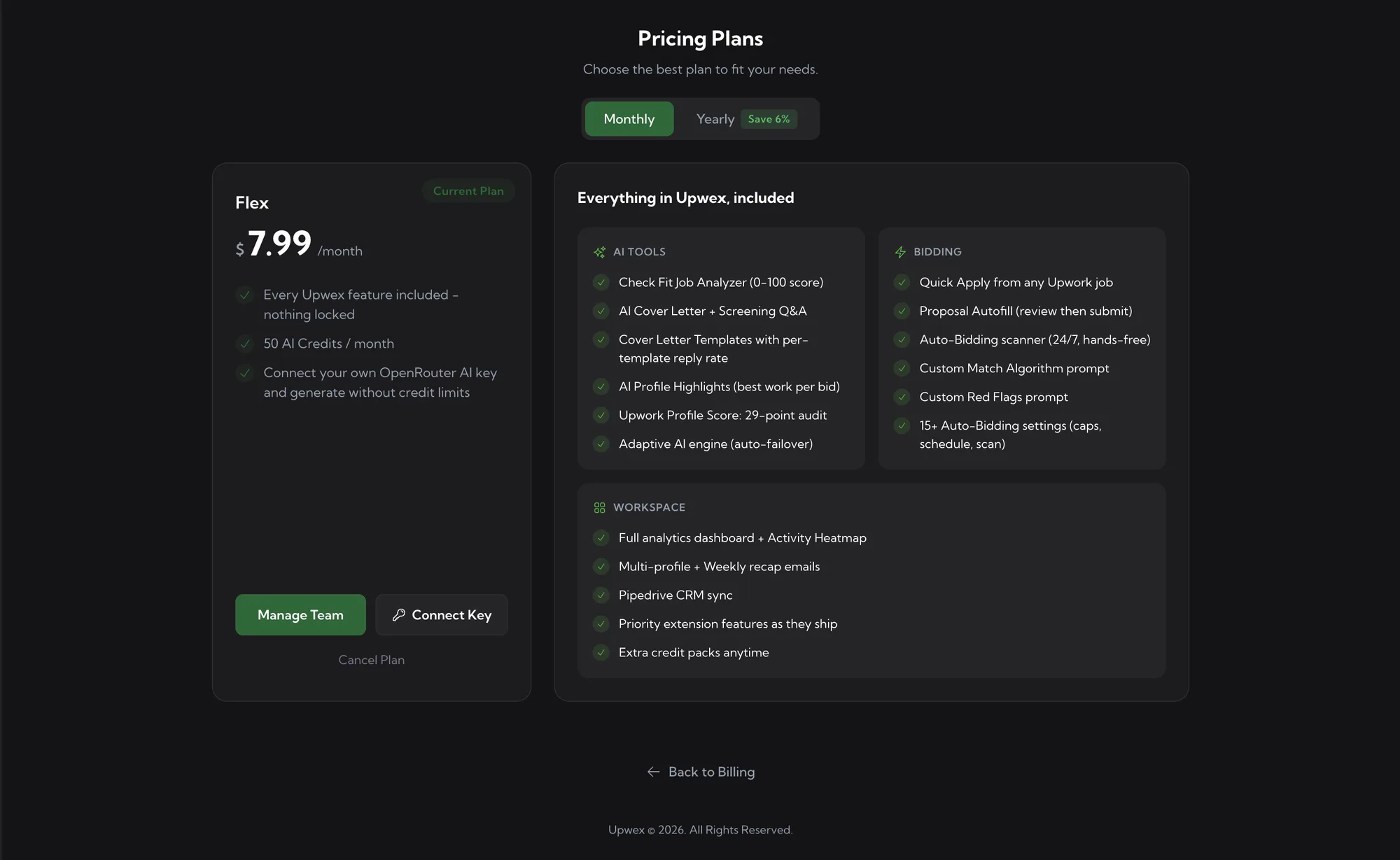
Open account.upwex.io/plans to see the plan. At the top there is a Monthly / Yearly toggle, below it the Flex card, and next to it the Everything in Upwex, included panel with the full feature list grouped into AI Tools, Bidding and Workspace.
When you are on a paid Flex plan, the card shows a green Current Plan badge, a Manage Team button, a key button (Connect Key, or the status of your key if one is connected) and a Cancel Plan link.
Price
- Monthly – $7.99 per seat per month.
- Yearly – $89.99 per seat per year. The toggle marks it as Save 6% compared with paying monthly.
Depending on your location, tax may be added on top. The Billing page shows your price including tax.
What is included
Every Flex seat gets the whole product:
- AI tools – Check Fit job analyzer (0-100 score), AI Cover Letter + Screening Q&A, Cover Letter Templates with per-template reply rate, AI Profile Highlights, Upwork Profile Score (29-point audit), Adaptive AI engine with auto-failover.
- Bidding – Quick Apply from any Upwork job, Proposal Autofill (review, then submit), the 24/7 Auto-Bidding scanner, Custom Match Algorithm prompt, Custom Red Flags prompt and 15+ Auto-Bidding settings (caps, schedule, scan).
- Workspace – the full analytics dashboard with Activity Heatmap, multiple Upwork profiles with weekly recap emails, Pipedrive CRM sync, priority extension features as they ship, and extra credit packs whenever you need them.
AI Credits
Each seat adds 50 AI Credits per month to your team. The team shares one pool, so a team of 3 seats has 150 credits a month. The pool resets every billing month – the Credits card on the Billing page shows the next Resets date.
If you need more, buy an extra pack on the AI Credits page with Top Up. Extra credits never expire. See Understanding AI Credits and Top up AI Credits for details.
Your own OpenRouter key
On a paid Flex subscription you can connect your own OpenRouter API key. AI generation then runs on your OpenRouter balance and does not use Upwex AI Credits – you pay OpenRouter directly. To connect it, open Tools & Apps (or the OpenRouter key card on the Billing page), click Connect, paste the key and click Validate & Save Key. If the key stops working or runs out of balance, AI goes back to your plan credits automatically.
Free trial
New accounts start with a 7-day free trial on Flex. The trial includes 20 AI Credits for the whole 7 days (they do not reset during the trial). All features work during the trial except connecting your own OpenRouter key, which becomes available once you subscribe. When the trial ends, choose Flex to keep going.
If you are on Lite, Pro or Max
Your plan keeps working as before. On the Pricing Plans page it appears as a Your current plan strip above the Flex card, with a Cancel plan link. To move to Flex, click Upgrade on the Flex card. The switch happens right away with a prorated charge, and your unused credits move to your extra balance, where they never expire. See Switch to Flex or change your billing period for the full steps.
Seats and cancelling
Every team member uses one paid seat, and both the price and the credits are counted per seat. Manage seats from the Team page. To stop your subscription, click Cancel Plan – it stays active until the end of the current billing period. See Cancel your subscription.
What’s next
- Understanding AI Credits – what they are and how to monitor usage
- Top up AI Credits – buy extra credits anytime
- Switch to Flex or change your billing period – moving from an old plan and switching between Monthly and Yearly
- Edit billing information (including VAT) – invoice details and tax
- Connect your own OpenRouter AI key – use your own AI key instead of Upwex credits